Edge Inspector: Why You Need a DevTools Extension for Adobe Web SDK
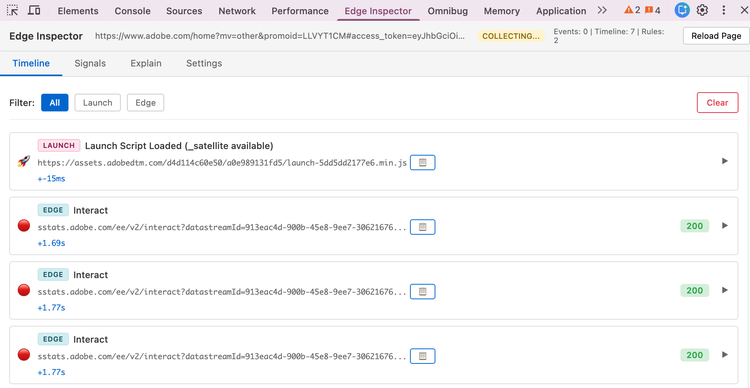
If you work with Adobe Experience Platform Web SDK (alloy.js), Adobe Target, or Adobe Analytics, you’ve probably spent time in the Network tab digging through `adobedc.net`, `tt.omtrdc.net`, and `sc.omtrdc.net` requests, trying to see what fired when and whether your implementation is healthy. Edge Inspector is a Chrome DevTools extension built to make that job easier.
Why It’s Needed
The Adobe Web SDK and related products (Launch, Target, Analytics) generate a lot of client-side and network activity. Out of the box you get:
- Scattered signals — Edge Network, Target Delivery API, Analytics collection, and Launch script loads all show up as separate requests with different URL patterns and payloads.
- No single timeline — Correlating “this click happened, then this Target request, then this Analytics hit” means jumping between tabs and filtering by hand.
- Hidden problems — Race conditions (e.g. sending events before Launch or `configure` has run), missing or duplicate calls, and rule violations are easy to miss in raw network logs.
- Opaque payloads — Request/response bodies are JSON-heavy; without structure it’s tedious to see what was sent and what came back.
Edge Inspector exists to capture, normalize, and surface that activity in one place, with a clear timeline and basic health checks, so you can debug and validate implementations faster.
What It Does
- Unified timeline — Launch script loads, SDK init, Edge events, Target (Delivery API, Notifications), and Analytics requests appear in one chronological view with product badges (Edge / Target / Analytics) and filtering.
- Request/response inspection— Expand any entry to see URL, method, status, and full request/response payloads, with a one-click copy for JSON.
- Signals & health — Session-level view of SDK state, event counts, personalization requests, and rule violations or best-practice warnings.
- Explain view — Build a prompt from the current session (intro, data selection, closing) and copy it to use with an LLM for analysis or documentation, all client-side.
Everything runs in the browser; there’s no backend and no data leaves your machine beyond what the page already sends to Adobe.
Pros
Who It’s For
- Implementers — People integrating or maintaining Adobe Web SDK, Target, or Analytics on a site.
- QA / validation — Anyone checking that the right events and requests fire in the right order.
- Support & consultants — Debugging client implementations without guessing from raw network logs.
If you’re already opening DevTools to inspect alloy.js or Adobe endpoints, Edge Inspector is built to make that inspection focused and repeatable—so you spend less time correlating requests and more time fixing or improving the implementation.